
Localeyez app | Mobile Redesign
OVERVIEW
- Summary
The BUJU app is an app inspired by Bullet Journaling and quiet desperation.
/ˈbo͝olət/ /ˈjərnl/
A bullet journal, or BuJo for short, is a method of personal organization. Instead of blank pages, the system organizes schedules, reminders, to-do lists, progress tracking and other organizational tasks into a single notebook.
We know, nothing compares to handwritten notes and striking items off a list, but its 2021 and toting around a diary and markers is just not efficient.
In this UX Case Study, I will cover the research and discovery process used during the 3 week design sprint and explain how we arrived at a Minimum Viable Product that satisfies client requirements and user needs. - Role & Responsibilities
UX Research
& User TestingInformation Architecture
& Content StrategyUx/ui design
& Visual DesignTarget Audience identification Persona & User Story development
User Flow & Story BoardingProcess & Wireframe sketches
Paper Prototype
Digital WireframeClickable lo-fi Prototype
User testing
Summary of findings
Plans for development - Problem & pain points
PROBLEM STATEMENT: Users need one clean centralized place to organize schedules and notes. They need entries that account for the nuances of events, to-do’s, notes and habits, and customized views so they can better plan their lives.
- Target audience & traits
busy
Ambitious
organized
Time or People managersMen & Women
Ages 25-45
educated
Working professionals
Students
Mindfulness practitioners
entrepreneursTest the hi-fidelity solution yourself
View Prototype
Process
- DISCOVERY & RESEARCH
From the web
A survey of 621 Microsoft employees on how they manage personal and household scheduling found:
59% (368) of respondents told us they used a digital calendar as their primary personal calendar.
Respondents reported using a median of 3 different calendars (paper and digital combined) at least once a week...
When asked how satisfied they are with their current method of scheduling household events, the median response was "somewhat satisfied" and 24% (150) reported being dissatisfied with their current scheduling method.
See the full PDF article here
In-house surveys
A survey conducted testing 9 men and women found:
6/9
8/9
9/9
surveyed aRE TRYING TO FORM OR BREAK A HABIT
surveyed OFTEN MAKE LISTS OR NOTES FOR THEMSELVES
surveyed WOULD LIKE TO BE ABLE TO TRACK PROGRESS ON AN APP
See the full Google forms survey responses here
- user personasPERSONA : THE STUDIOUS STUDENT

Theme: Calendar chaos
Jenny T.
26 years old
Denver, CO
Single
MBA student at University of Denver
GOALS: Graduate on time and get hired within 3 months of of graduation, full time, making at least $70k.
FRUSTRATIONS: Balancing school and life. Not getting her moneys worth on her IKON season pass (ski lift pass). Getting poor sleep. Bad first dates.
MOTIVATIONS: Getting good grades and networking. Finding a great mentor. Snowboard at least 2 days and attend 1-2 happy hours every week. Finding a caring life partner who is equally as active.persona 2: Help with self help
Theme: 30 days to form a habit
Gabe J.
29 years old
Seattle, WA
In a relationship
Montessori Art Teacher
GOALS: Have a solid daily mindfulness practice consisting of drinking 3.5 liters of water, writing in his gratitude journal, reading for 30 minutes and stretching.
FRUSTRATIONS: Forgetting about daily habits he is trying to form. Being too busy. Not being able to help his students on a mental/emotional level.
MOTIVATIONS: React compassionately and expand his buddha nature. Bring art to the world and inspire the kids he teaches. Sell the art he makes on the side. Move in with his girlfriend.persona 3: The Professional
Theme: Big goals, little steps
Sara B.
35 years old
San Diego, CA
Wife & mother of a young son
Geographer
GOALS: Be a good mom (and wife) by providing love, mental/ emotional support and a healthy lifestyle to her family. Learn about investing in the market. Grow her own produce.
FRUSTRATIONS: Not having enough time in the day for herself. Her needy boss. Judging whether she is being a good enough mom or wife. Lack of sleep.
MOTIVATIONS: Save up a good chunk of money for her son's college fund and for her own retirement. Learn all about investing so she can put her money to work. - Competitive Analysis & Mental Models
The biggest competitors in the life planning space are Google Calendar, Microsoft Outlook Calendar and generic note taking apps like Apple Note, Notion, Trello and Evernote. But even the best competitors don't measure up when it comes to the nuance of life events and calendar or journal entries.

One of our main competitors, Google Calendar, is a time-management and scheduling calendar service developed by Google. Analysis of the app revealed some interesting strengths, opportunities and weaknesses that BUJU can learn and improve upon. Coming in at 4.3 stars out of 5 (Based on 1,607,460 votes) in the Google Play Store and scoring fourth place for usage rank for top productivity Android apps in the USA according to Similarweb, it's easy to see they are doing some things right.
STRENGTHS
Market adoption due to familiarity with some or all of the Google Workplace is ubiquitous. Brand recognition will be hard to compete against as they are a trusted name and still the worlds most popular search engine. The app UI is clean and spacious, and utilizes color well. The app is fairly learnable and has a wide breadth of scheduling features. Toggling views by time increment, being able to share invites, setting reminders and recurrences are just some of their greatest strengths.
WEAKNESSES
The calendar viewport works well when there aren't many event entries, but can start to look unclear and overwhelming when multiple events stack up or overlap in one day. Entries color can be selected by the user, but this differentiating feature can still create colorful chaos on an entry dense calendar.
Specific analysis of the entry occurrence interval settings has some massive short comings. The option to have an event recur on the 13th of every month is not possible which is a big problem because most bills are due on the same date each month for example.
OPPORTUNITIES
Being able to toggle the view to see some entries while hiding others will be a big focus of BUJU. Not all calendar entries are equal so it it important that people be able to filter their view to see actionable items while filtering out notes and lesser important entries. Birthday reminders, eating habits log or ovulation cycles do NOT need to be competing for visual real estate with entries like plane flights, important meetings or job interviews.
Below is an example of the long press or touch and hold gesture, a feature BUJU is excited to deploy to keep in alignment with the goal of an uncluttered UI. This feature is growing in popularity thanks to apps like Pinterest and the Guardian. This gesture minimizes navigational clutter while maximizing options available to users. This is a mental model used by BUJU when adding a new entry such as an event, to-do, habit or note. With multiple entry types to choose from, it's important to minimize buttons on an already content rich platform like a calendar.

- user flow

Like most calendar or journaling apps, the main use cases include reviewing existing schedules or notes, adding new entries or revising existing ones. A main nuance with BUJU entries is the distinction between an event, a to-do, a note or habits.
EVENTS usually involve stricter timelines and other people we must account for, like a wedding or a movie date.
TO-DO's are like notes to self but are actionable with flexible timelines, like watering plants or meal prepping on the weekend.
NOTES are generally just thoughts and ideas for personal use. These would typically be stored in ta specific journal such as "Life Admin" or "2021 Goals."
HABITS are small tasks performed frequently in order to form a new habit. Because they are small and inconsequential, they need not take up a lot of space on a calendar view. For example, journaling for 10 minutes every day. - Sketches & Storyboard
Primary functions to guide sketch process:
Review Calendar or Journal
Modify Calendar or Journal
Add New Calendar or Journal Entry (And/or related to-do’s)
Add New Habit
Habit Tracking
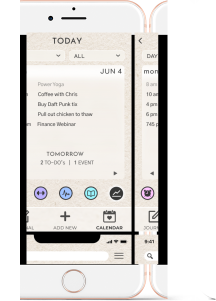
The sketches above are iterations on how best to present the most important information on the home screen. It is important that the user be able to see upcoming action items first and filter views based on priority level. BUJU presents all entry types on the current day on the home screen.

Storyboarding the Habit Entry process was a familiar process because I have a similar practice with the paper calendar hanging in my room. The goal is to be gently reminded so the task is brought to your attention but without much cognitive overload or taking up too much calendar real estate. This is why we decided to display habits as small customizable icons that have symbolic significance to the user. Habits are displayed on the current day view as a small button that disables with grayscale once the task has been marked complete. Aggregated habit progress can be viewed on the habit tracking page.
- WIREFRAMES & CLICKABLE PROTOTYPES

“Not all calendar entries are created equal.”
Guiding Principles of logic and fidelity throughout the design process:
HI-FIDELITY COPY
In order to properly visualize the way users might interact with the product, placeholder text was scarcely used. By carefully considering the client goals and user needs, polished copy was used on initial wireframes.
PRIORITIZATION
Priority level of a calendar entry is important for people to immediately glean so they can plan effectively. Being able to filter your view by entry type is an imperative to achieve hierarchy of view.
INTERCONNECTIVITY
Triaging and interconnecting entries is important for large goals that need to be broken down into smaller steps. Calendar entries with affiliated sub entries help organize actions and keep the user on track, much like when planning a vacation or committing to running a marathon.
NOTIFICATION
Having active, passive or no notification is important for a user to perform well. Gentle or passive notifications work for daily habit reminders, however, a job interview or flight reminder would require greater emphasis or acknowledgement.
ProTOTYPE
- USABILITY TESTING & RECOMMEDNATIONS
Five Usability tests were conducted over the course of two days to gather feedback about the usability of the BUJU app.
Task scenarios included creating a new event, asking what the different entry types were and where they might expect to find the Habit Tracker page.
All users were able to perform all task scenarios, however, most insights came from the qualitative feedback. Issues discovered during the usability tests, lead to the following solutions and recommendations:
ACCESS
The Habit Tracking icon location was moved to the home screen and was converted to an icon for easier navigation. It became apparent that this feature was in higher demand than originally hypothesized, and was therefore moved to a more prominent and intuitive location.
REDUCE
When editing an entry, the user was prompted to save the edit and then save the entry. Unnecessary clicks were removed from the process in order to make the experience more intuitive and user friendly.
RESPOND
Based on existing mental models, we know people have grown accustomed to understand meaning through icons. Because calendars are already data heavy, the continued effort to minimize text and communicate via icons is a high priority. The original interaction for habit completion was to have the icon disappear, again to reduce visual noise. But user insights indicated that the response would be more rewarding if the interaction provided some trace like a “green check mark” as opposed to nothing. Reinforcing the action through reward is a feedback loop we want to encourage.
ONBOARDING
Because the app favors icons over text, it was noted that an improved onboarding experience could be an ideal time to introduce users to the location, meaning and ability of the symbols. This allowed us to remove redundant links and further improve the look of the home page.
VERBIAGE
Though the jargon is specific to Bullet Journaling, it was ultimately decided that we use the word “Journals” instead of “Collections” when referring to the note taking part of the app. “Journals” is more familiar and requires no explanation. One user stated “The word ‘Collections’ requires people to think too hard about what it is.”
FINAL THOUGHTS
- OUTCOME
DEEP DIVE
Collect more info about frequency of viewing habit trends. What entry type do people use most? Do people thread associated to-do’s, habits or events together like expected? Would it be useful to have entries connected to others or not?
WHAT WORKED
Brainstorming use cases I personally experience (as the intended target audience) and surveying others' scheduling needs. Filtering entry types by actionable and non-actionable.
WHAT DIDN'T
Assuming how often people want to view their habit trends.
WHAT I WOULD HAVE DONE DIFFERENTLY
Use components more wisely. Use lowest fidelity at the outset. Iterated more on the visual designs later on. Discussed more use cases with potential users.
WHAT WAS LEARNED
The importance of filtering or customizing views. Making interactions responsive.
HOW ILL USE THAT IN THE FUTURE
We will spend more time using onboarding and visual design to teach users how best to interact with the product.